











- Description
- Minimum Requirements
- Specifications
- Additional information
- Reviews
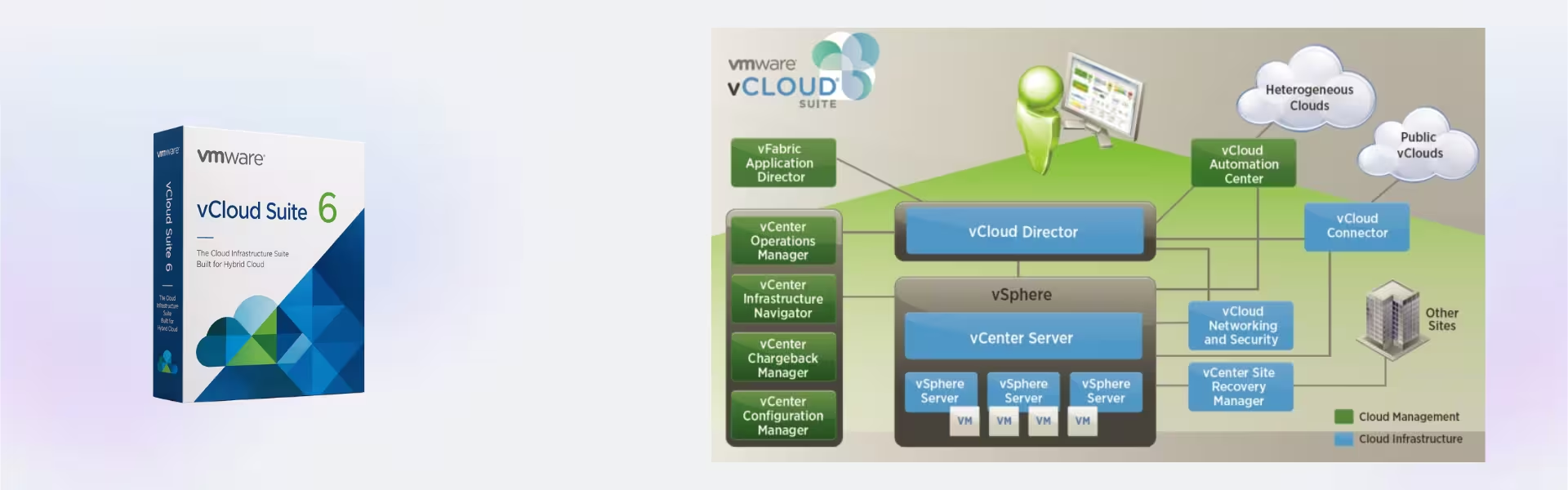
VMware vCloud Suite 6 Enterprise helps businesses manage VMware cloud systems with more control, speed, and flexibility. You get instant digital delivery, lifetime usage, and no subscription, so your team can build a stronger cloud setup without ongoing fees.
It is a strong choice for IT teams that need enterprise-grade cloud management, reliable virtualization support, and smoother daily operations.
Overview of VMware vCloud Suite 6 Enterprise
- Platform: VMware ESXi 5.5 or newer
- Edition: Enterprise
- License Type: Retail
- Devices: 1 Device/ 5 Devices/ 10 Devices/ 20 Devices
- License Duration: Lifetime
- Activation Method: Online activation
- Delivery: Instant digital delivery via email
- Support: Email and remote assistance
- Language Support: Multi-language
- Compliance: Genuine software licenses sourced through compliant distribution channels in line with EU laws (EU Directive 2009/24/EC) and industry standards.
Key Features
- Enterprise Cloud Management: Manage VMware cloud resources from one platform, so your team can save time and reduce daily work.
- Advanced Automation: Automate common IT tasks, which helps speed up service delivery and reduce manual errors.
- VMware ESXi Support: Work with VMware ESXi 5.5 or newer, so businesses can support existing VMware environments.
- Scalable Infrastructure: Add more resources as needs grow, which helps your business expand with less disruption.
- Resource Optimization: Use computing power more wisely, so teams can reduce waste and improve system value.
- Policy-Based Control: Set clear rules for users, workloads, and resources, so your cloud setup stays organized.
- Lifetime Usage: Use the product after activation with no monthly or yearly subscription.
Main Features Explained
Cloud Resource Control
VMware vCloud Suite 6 Enterprise helps admins manage cloud resources, virtual systems, and workloads more clearly. As a result, teams can improve daily control and reduce tool switching.
Automation for Faster IT Work
The suite helps automate repeat tasks across VMware environments. Therefore, IT teams can deploy services faster and lower the risk of setup mistakes.
Scalable Cloud Operations
Businesses can grow their VMware cloud setup as demand increases. In turn, teams can support more users, workloads, and services with less effort.
Enterprise-Level Management
The Enterprise edition gives teams stronger tools for larger and more complex setups. This matters because bigger environments need better control, planning, and consistency.
Why Choose VMware vCloud Suite 6 Enterprise?
VMware vCloud Suite 6 Enterprise suits IT teams, data centers, managed service providers, and businesses that need strong private cloud control. It helps teams manage VMware resources, improve service delivery, and support critical workloads with more confidence.
Also, it works well for companies that want a long-term VMware solution without recurring subscription costs. You can explore more professional software tools in our Computer Programs category.
For users who need a lighter related edition, VMware vCloud Suite 6 Standard offers a useful comparison for core VMware cloud management needs.
In addition, teams upgrading their virtualization platform may consider VMware vSphere 8 Standard, while those managing central infrastructure can explore VMware vCenter Server 8 Standard.
VMware vCloud Suite 6 Enterprise vs Alternatives
VMware vCloud Suite 6 Enterprise offers a broader set of cloud management and automation tools for larger VMware environments. By contrast, VMware vCloud Suite 6 Standard suits teams that need core cloud control with a simpler feature set.
Therefore, VMware vCloud Suite 6 Enterprise works best for businesses that need stronger management, more scale, and enterprise-level VMware cloud operations.
System Compatibility
VMware vCloud Suite 6 Enterprise works with VMware ESXi 5.5 or newer. Before installation, make sure your VMware hosts, virtual machines, and management tools meet the required setup needs.
For best results, check your server hardware, ESXi version, network setup, and VMware configuration before activation.
License Type Explanation
This product includes a Retail license for a one-time purchase. Once you activate it, you can use it for life with no subscription.
You can install the license only once on the selected device. However, you cannot transfer it after activation. If you uninstall the software or format the device, the license is lost and cannot be used again.
Therefore, this option suits users who want lifetime use on a fixed VMware system.
Installation & Activation
- Complete your order through our secure checkout.
- Receive the product details by email through instant digital delivery.
- Prepare your VMware ESXi 5.5 or newer environment.
- Install VMware vCloud Suite 6 Enterprise on the supported system.
- Activate the product online with the provided details.
- Contact our support team if you need help during setup.
Why Buy From Us?
Digital License helps customers get genuine software, secure payment, and clear support. Moreover, we follow compliant sourcing practices for safe business and professional use.
- Genuine software licenses
- Secure payment process
- Instant digital delivery by email
- Email and remote assistance
- Compliance with EU laws (EU Directive 2009/24/EC) and industry standards
- Helpful support before and after purchase
Trust & Reliability
Your business needs software that performs well and comes from a trusted source. That is why Digital License focuses on genuine products, secure checkout, fast delivery, and helpful customer support.
Frequently Asked Questions
How will I receive VMware vCloud Suite 6 Enterprise?
You will receive the product details by email after purchase through instant digital delivery.
How do I activate VMware vCloud Suite 6 Enterprise?
You activate the product online using the details sent to your email.
Does VMware vCloud Suite 6 Enterprise expire?
No. Once activated, it gives lifetime usage.
Is VMware vCloud Suite 6 Enterprise a subscription?
No. This is a one-time purchase with no monthly or yearly subscription fees.
Can I transfer the Retail license?
No. This Retail license cannot be transferred after activation.
What happens if I uninstall the software or format the device?
If you uninstall the software or format the device, the license is lost and cannot be used again.
Is VMware vCloud Suite 6 Enterprise compatible with VMware ESXi?
Yes. It works with VMware ESXi 5.5 or newer. However, you should check your system setup before installation.
Is support included?
Yes. Email and remote assistance are included.
Is the product legal to use?
Yes. Licenses are sourced through compliant distribution channels in line with EU Directive 2009/24/EC and industry standards.
Who should use VMware vCloud Suite 6 Enterprise?
It suits IT teams, data centers, service providers, and businesses that manage enterprise VMware cloud environments.
| Component | Requirements |
| Processor | 64-bit x86 CPU with at least 2 cores (Intel VT-x or AMD-V virtualization support required) |
| RAM | Minimum 8 GB |
| Storage | Minimum 40 GB free space |
| Operating System | VMware ESXi 5.5 or newer |
| Network | 1 Gbps network adapter |
| Display | Web-based management interface (modern browser required) |
| Specification | Detail |
|---|---|
| Activation | Single PC (one-time activation) |
| License validity | Lifetime (does not expire after activation) |
| Delivery method | By email within 15 minutes |
| Languages | Multilingual |
Additional information
| Devices | 1 Device, 5 Devices, 10 Devices, 20 Devices |
|---|

1 – Buy
Shop securely with SSL encryption.

2 – Receive
You will receive the license key and download link.

3 – Download
Download and install the software.

4 – Activate
Enter the license key to the software.
Ashampoo 3D CAD Professional 10