








































- Description
- Minimum Requirements
- Specifications
- Reviews
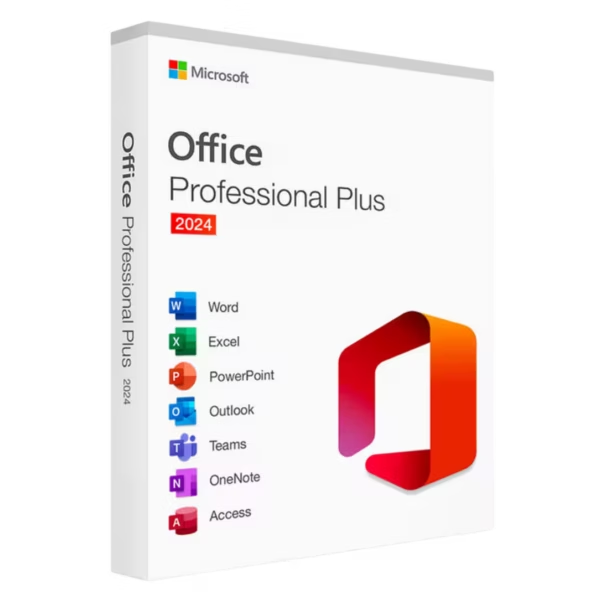
Microsoft Office 2024 Professional Plus delivers a modern desktop productivity suite for businesses, professionals, administrators, and advanced users. Create documents, analyze data, build presentations, and manage communication with familiar Microsoft tools. You also get instant digital delivery, lifetime usage, and no subscription fees.
Overview of Microsoft Office 2024 Professional Plus
- Platform: Windows
- Edition: Professional Plus
- License Type: LTSC
- Devices: 1 device
- License Duration: Lifetime
- Activation Method: Online activation
- Delivery: Instant digital delivery via email
- Support: Email and remote assistance
- Language Support: Multi-language
- Compliance: Genuine software licenses sourced through compliant distribution channels in line with EU laws and industry standards
Key Features
- Microsoft Word: Create contracts, reports, letters, and professional documents. Clear editing tools help you produce polished content efficiently.
- Microsoft Excel: Build spreadsheets, perform calculations, and organize business data. Therefore, reporting, budgeting, and analysis become easier.
- Microsoft PowerPoint: Create presentations with text, images, charts, and visual elements. This helps you communicate ideas and results clearly.
- Microsoft Outlook: Manage email, calendars, contacts, and appointments. As a result, business communication stays organized.
- Microsoft Access: Create and manage databases for records, inventory, contacts, and structured information. This supports efficient data management.
- Microsoft OneNote: Keep notes, research, ideas, and project information organized. This makes important details easier to access.
- Desktop productivity: Work with locally installed Office applications on your Windows computer. This provides a stable environment for regular professional tasks.
- Lifetime usage: Continue using the activated installation without recurring subscription payments. This makes it a practical one-time purchase.
Main Features Explained
Microsoft Word
Microsoft Word helps you create and edit professional documents. You can prepare reports, proposals, contracts, letters, and business content.
In addition, its formatting tools keep documents clear and consistent. Therefore, daily writing tasks become easier to manage.
Microsoft Excel
Microsoft Excel helps organize numbers and business information. Use formulas, tables, and charts to understand data more clearly.
For example, you can manage budgets, schedules, reports, and business records. As a result, Excel supports better planning and analysis.
Microsoft PowerPoint
Microsoft PowerPoint turns ideas into structured visual presentations. Add text, images, charts, and graphics to create clear slides.
This makes it useful for meetings, training, sales, and education. Moreover, strong layouts help audiences understand key information faster.
Microsoft Outlook
Microsoft Outlook brings email, calendars, contacts, and scheduling tools together. It keeps everyday communication in one familiar application.
Therefore, professionals can manage messages and appointments more efficiently.
Microsoft Access and OneNote
Microsoft Access supports structured database management. Meanwhile, Microsoft OneNote helps organize notes, ideas, and project information.
Together, they add useful tools for business data and daily organization.
Why Choose Microsoft Office 2024 Professional Plus?
Microsoft Office 2024 Professional Plus suits businesses, professionals, administrators, students, and advanced users. It covers documents, spreadsheets, presentations, email, databases, and note-taking.
Word handles document work, while Excel supports calculations and reports. Meanwhile, PowerPoint helps with presentations, and Outlook keeps communication organized.
You can explore our Microsoft Office 2024 options to compare available editions. This makes it easier to choose the right version for your workflow.
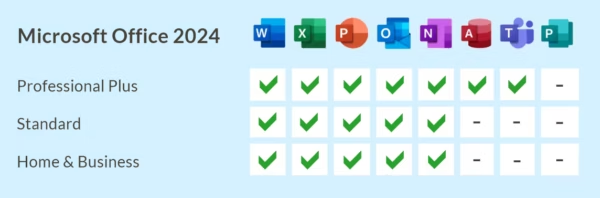
If you need a simpler edition for home and business tasks, compare it with Microsoft Office 2024 Home & Business. Professional Plus is better suited to users who need a broader set of business tools.
Once activated, this product provides lifetime usage. In addition, there are no recurring Office subscription payments.
Microsoft Office 2024 Professional Plus vs Alternatives
Microsoft Office 2024 Professional Plus provides a broad desktop productivity environment for demanding professional use. It is designed for users who need advanced Office tools on one Windows computer.
Home & Business focuses on more common office tasks. In contrast, Professional Plus is better suited to businesses and advanced users who need a wider professional toolset.
If you also need an operating system for a new setup, consider Office 2024 Professional Plus with Windows 11 Pro. This option combines professional productivity software with a business-focused Windows environment.
System Compatibility
Microsoft Office 2024 Professional Plus is designed for compatible Windows computers. Before installation, check that your operating system and hardware support Office 2024.
Also, make sure your computer has enough memory and storage. Existing Office installations may need attention before setup.
Finally, complete your Windows setup before activation. This helps prevent unnecessary activation problems later.
License Type Explanation
This product uses an LTSC license. Under the terms of this specific offering, it can be installed and activated once on one computer.
After successful activation, it provides lifetime usage and does not expire. It is also a one-time purchase, so there are no recurring subscription payments.
However, this LTSC license cannot be transferred or reused on another computer. Therefore, choose the final device before activation.
If Office is uninstalled, the license is lost. The same applies if the activated computer is formatted.
The required download files are prepared by Digital License under our Microsoft partnership and hosted on our servers. This provides a clear installation process for this specific offering.
Installation & Activation
- Check that your Windows computer meets the Office 2024 system requirements.
- Download the installation files using the instructions provided after purchase.
- Install Microsoft Office 2024 Professional Plus on the intended computer.
- Open an Office application and connect to the internet.
- Complete the required online activation.
- If needed, contact our team for email or remote assistance.
Why Buy From Us?
Digital License provides genuine software licenses, secure payments, fast digital delivery, and professional support. Therefore, you can purchase and activate your software with confidence.
- Genuine licenses sourced through compliant distribution channels
- Secure payment for a protected checkout experience
- Instant digital delivery directly via email
- Professional support through email and remote assistance
- EU compliance in line with EU laws, including EU Directive 2009/24/EC, and industry standards
Digital License Is a Verified Microsoft Partner
Digital License is an official Microsoft Partner (ID: 7033487), recognized for delivering genuine software licenses and verified solutions across Europe. You can verify our partnership directly on the Microsoft Partner Directory. This ensures every license you purchase is authentic, secure, and fully compliant with Microsoft standards and applicable EU. laws (EU Directive 2009/24/EC) and industry standards.
Frequently Asked Questions
How do I activate Microsoft Office 2024 Professional Plus?
Install Office on the intended Windows computer. Then connect to the internet and complete the online activation.
How is Microsoft Office 2024 Professional Plus delivered?
You receive it through instant digital delivery via email. Therefore, there is no physical shipping delay.
Does Microsoft Office 2024 Professional Plus require a subscription?
No. This offering is a one-time purchase with lifetime usage after successful activation.
Which applications are included?
The Professional Plus edition provides major productivity tools such as Word, Excel, PowerPoint, Outlook, Access, and OneNote.
Who should use Microsoft Office 2024 Professional Plus?
It suits businesses, professionals, administrators, and advanced users who need a broad desktop productivity environment.
Can I transfer this LTSC license to another computer?
No. Under the terms of this specific LTSC offering, it is intended for one-time activation on one computer and cannot be transferred or reused.
What happens if I uninstall Office?
If Office is uninstalled, the license is lost and cannot be reused. Therefore, keep the activated installation in place.
What happens if I format the computer?
If the activated computer is formatted, the license is lost. Complete your final Windows setup before activation.
What is the difference between Professional Plus and Home & Business?
Home & Business focuses on common productivity needs. Professional Plus is better suited to advanced professional and business workflows that require a broader toolset.
Is purchasing this software compliant with EU law?
Digital License supplies genuine software licenses through compliant distribution channels in line with applicable EU laws, including EU Directive 2009/24/EC, and industry standards.

| Component | Requirement |
| Processor | 1.6 GHz or faster, 2-core processor |
| RAM | 4 GB RAM for 64-bit; 2 GB for 32-bit |
| Storage | At least 4 GB of available disk space |
| Operating System | Windows 10, Windows 11, or Windows Server 2019/2025 |
| Graphics | DirectX 9 or later with WDDM 2.0 or higher for Windows 10 |
| Display | 1280 × 768 screen resolution |
| Specification | Detail |
|---|---|
| Activation | Single PC (one-time activation) |
| License validity | Lifetime (does not expire after activation) |
| Delivery method | By email within 15 minutes |
| Languages | Multilingual |

1 – Buy
Shop securely with SSL encryption.

2 – Receive
You will receive the license key and download link.

3 – Download
Download and install the software.

4 – Activate
Enter the license key to the software.
Microsoft Visio 2021 Professional
Microsoft Visual Studio 2022 Professional
Microsoft Office 2016 Professional Plus Bind
Microsoft Office 2019 Professional Plus
Microsoft Office 2021 Professional Plus
Microsoft Office 2024 Home & Business
