






































- Description
- Minimum Requirements
- Specifications
- Reviews
VMware Thinapp for Application Virtualization is built for professionals who need fast, portable, and reliable application virtualization on Windows. It gives you instant digital delivery, lifetime usage, and no subscription costs.
With a one-time purchase, you can package applications, reduce installation conflicts, and simplify software deployment across compatible Windows environments.
Overview of VMware Thinapp for Application Virtualization
- Platform: Windows
- License Type: Retail
- Devices: 1 Device
- License Duration: Lifetime
- Activation Method: Online activation
- Delivery: Instant digital delivery via email
- Support: Email and remote assistance
- Language Support: Multi-language
- Compliance: Genuine software licenses sourced through compliant distribution channels in line with EU laws (EU Directive 2009/24/EC) and industry standards.
Key Features
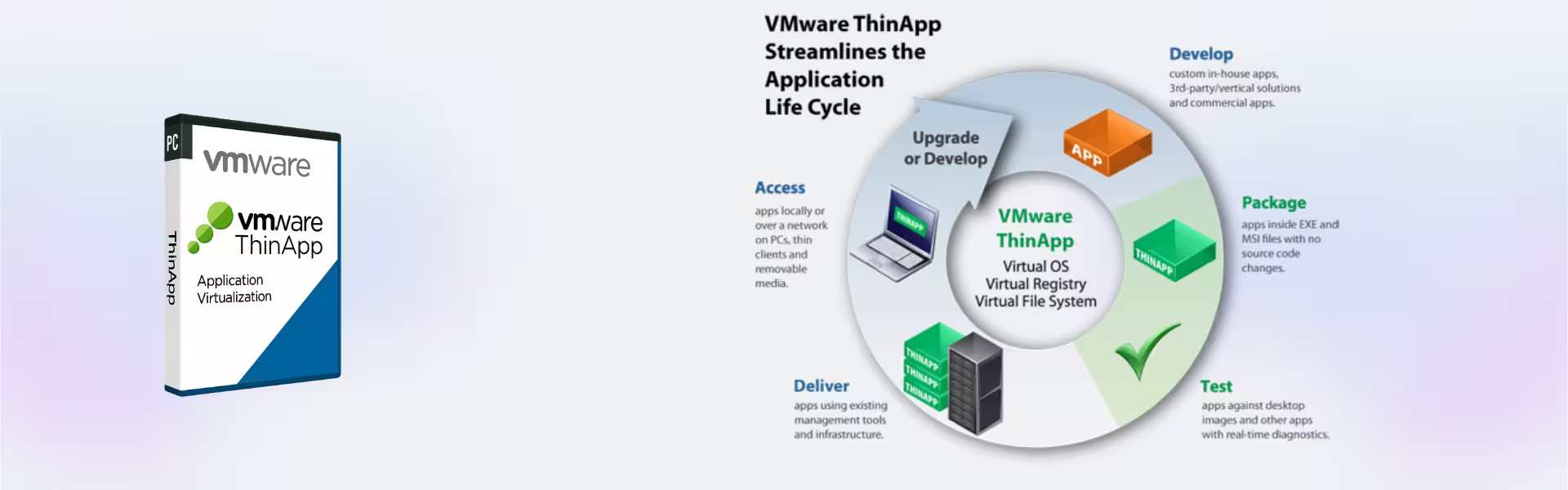
- Application virtualization: Run packaged applications without full local installation, helping reduce software conflicts.
- Portable app delivery: Deploy applications more easily across supported Windows systems, saving IT time.
- Isolation technology: Keep apps separated from the operating system, improving stability and control.
- Legacy app support: Use older applications in modern environments, which helps extend software value.
- Simplified deployment: Package apps once and distribute them faster across business workflows.
- No subscription: Pay once and use the software for life after activation.
Main Features Explained
Application Isolation
Application isolation packages programs into separated environments. As a result, apps can run without changing key system files or registry settings.
Portable Deployment
Portable deployment helps you deliver virtualized applications more easily to compatible Windows devices. This matters because it reduces setup time and keeps deployment cleaner.
Legacy Application Support
Legacy application support helps businesses keep important older software usable. Therefore, teams can protect existing workflows while reducing compatibility problems.
Reduced Software Conflicts
Because applications are packaged separately, they are less likely to interfere with other installed programs. This improves reliability for IT teams and professional users.
Why Choose VMware Thinapp for Application Virtualization?
VMware Thinapp for Application Virtualization is ideal for IT administrators, software deployment teams, developers, and businesses that need controlled Windows application delivery. It helps reduce installation issues, simplify testing, and support portable software access.
If you manage multiple virtualization tools, explore our virtualization software licenses category for related solutions. For users who need focused app packaging, VMware ThinApp is a practical choice for professional virtualization workflows.
For complete virtual machine creation and advanced local virtualization, you may also consider VMware Workstation 17.5 Pro. Mac users can compare it with VMware Fusion 13 Pro Mac.
VMware Thinapp for Application Virtualization vs Alternatives
VMware Thinapp for Application Virtualization focuses on packaging and running applications in isolated virtual environments. In contrast, VMware Workstation is designed for running full virtual machines on Windows.
Choose ThinApp when your main goal is application portability and reduced installation conflicts. Choose Workstation when you need complete operating system virtualization.
System Compatibility
This product is designed for compatible Windows environments. Before activation, make sure your device meets VMware requirements and has a stable internet connection for online activation.
License Type Explanation
This is a Retail license for one Windows device. It is a one-time purchase with lifetime usage after activation.
The license can be installed and activated only once on one computer. It cannot be transferred or reused on another device. If the software is uninstalled or the device is formatted, the license may be lost.
Installation & Activation
- Complete your order securely online.
- Receive your instant digital delivery by email.
- Download and install VMware ThinApp on your Windows device.
- Enter the provided activation details.
- Activate online and start using the software.
- Contact support if you need email or remote assistance.
Why Buy From Us
Digital License provides genuine software licenses with fast delivery, secure checkout, and dedicated support. We also source licenses through compliant distribution channels in line with EU laws and industry standards.
- Genuine software licenses
- Instant digital delivery by email
- Secure payment process
- Email and remote assistance
- Compliance with EU laws, including EU Directive 2009/24/EC, and industry standards
Trust & Reliability
We focus on clear product information, secure purchasing, and reliable after-sales support. Therefore, you can order with confidence and activate your software license smoothly.
FAQ
How is VMware Thinapp for Application Virtualization delivered?
Your order is delivered digitally by email after purchase.
Does this product require a subscription?
No. It is a one-time purchase with lifetime usage after activation.
How do I activate the software?
You activate it online using the details provided after purchase.
Can I use it on more than one device?
No. This Retail license is for one device only.
Can the license be transferred?
No. Once activated, it cannot be transferred or reused on another computer.
What happens if I format my device?
If the device is formatted or the software is removed, the license may be lost because it cannot be reused.
Is this product legal?
Yes. Licenses are sourced through compliant distribution channels in line with EU laws and industry standards.
Is support included?
Yes. Email and remote assistance are included.
| Component | Requirement |
| Processor | 1 GHz or faster x86-compatible processor |
| RAM | 1 GB minimum (2 GB or more recommended) |
| Storage | 500 MB for installation (additional space required for captured applications) |
| Operating System | Windows 7, 8, 10, or 11 (32-bit or 64-bit) |
| Virtualization Environment | Clean OS environment recommended for application capture (VMware Workstation or similar) |
| Additional Software | Microsoft .NET Framework (required for some setup components) |
| Display | Standard display (no special GPU requirements) |
| Specification | Detail |
|---|---|
| Activation | Single PC (one-time activation) |
| License validity | Lifetime (does not expire after activation) |
| Delivery method | By email within 15 minutes |
| Languages | Multilingual |

1 – Buy
Shop securely with SSL encryption.

2 – Receive
You will receive the license key and download link.

3 – Download
Download and install the software.

4 – Activate
Enter the license key to the software.
Ashampoo 3D CAD Architecture 10
Ashampoo 3D CAD Professional 11
Corel Painter Essentials 7 (PC - Mac)
Nuance Dragon NaturallySpeaking Premium 13
