- Description
- Minimum Requirements
- Specifications
- Additional information
- Reviews
Stellar Data Recovery Premium is a powerful data recovery software for Windows and Mac users. It helps recover deleted files, lost files, and inaccessible data from computers, external drives, USB devices, memory cards, and other storage media.
You receive instant digital delivery by email after purchase. Choose the lifetime usage option for long-term recovery needs with no subscription, or select the 1-year option for flexible use.
Overview of Stellar Data Recovery Premium
- Platform: Windows/ Mac
- Edition: Premium
- Devices: 1 Device
- License Duration: 1 Year/ Lifetime
- Activation Method: Online activation
- Delivery: Instant digital delivery via email
- Support: Email and remote assistance
- Language Support: Multi-language
- Compliance: Genuine software licenses sourced through compliant distribution channels in line with EU laws (EU Directive 2009/24/EC) and industry standards.
Key Features
- Deleted file recovery: Recover deleted documents, photos, videos, emails, and folders from supported storage devices.
- Lost partition recovery: Restore files from missing or damaged partitions, which helps when a drive becomes unreadable.
- Photo and video repair: Repair corrupt media files, so important photos and videos can become usable again.
- Deep scan mode: Search storage devices more thoroughly when quick recovery does not find the missing files.
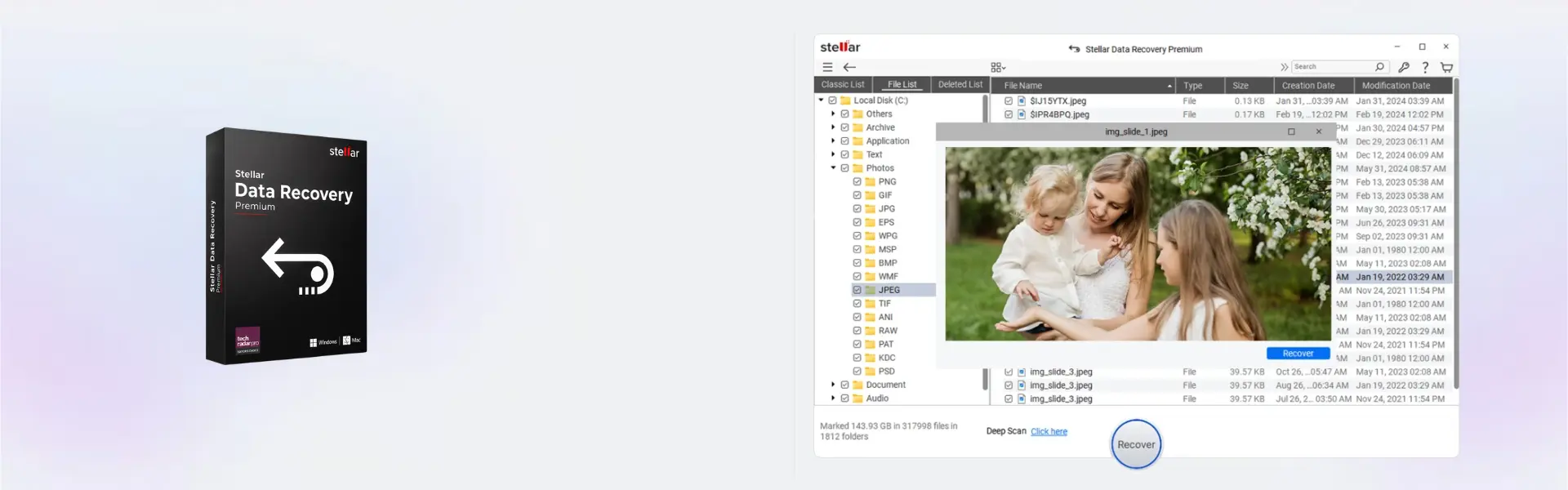
- Preview before saving: Check recoverable files before export, so you can save only the data you need.
- External drive support: Recover data from USB drives, memory cards, external hard drives, and other common storage media.
- Windows and Mac support: Use one product option for recovery tasks on supported Windows or Mac systems.
Main Features Explained
Deleted File Recovery
Deleted file recovery helps restore files removed by mistake. This is useful when documents, photos, videos, or work folders are deleted from a computer or external device.
As a result, you can recover important data without needing advanced technical skills.
Lost Partition Recovery
The software can scan missing, damaged, or inaccessible partitions. This matters when a drive appears empty, unreadable, or no longer shows the expected files.
Therefore, it gives users a practical way to recover data after partition errors or storage problems.
Deep Scan Recovery
Deep scan performs a more detailed search across the selected storage device. It is helpful when files are not found during a standard scan.
This feature improves the chance of finding older, hidden, or harder-to-detect files.
Photo and Video Repair
Stellar Data Recovery Premium includes repair tools for corrupt photos and videos. This is valuable when recovered media files do not open or play correctly.
It helps photographers, creators, and home users protect important visual memories and project files.
Preview Before Recovery
You can preview recoverable files before saving them. This helps confirm that the right files are available before the final recovery step.
In addition, it saves time and storage space by helping you avoid unnecessary exports.
Why Choose Stellar Data Recovery Premium?
Stellar Data Recovery Premium is designed for users who need more than basic file recovery. It combines data recovery with photo repair and video repair, making it useful for many real-world data loss situations.
This product is ideal for home users, professionals, photographers, students, freelancers, and small businesses. It helps recover files after accidental deletion, formatting, partition errors, drive issues, and media corruption.
For more recovery solutions, visit our backup and data recovery software category. If you need a broader professional recovery package, compare it with Stellar Toolkit for Data Recovery.
Stellar Data Recovery Premium vs Alternatives
Stellar Data Recovery Premium offers a stronger feature set than basic recovery editions. It is a better choice when you need file recovery plus media repair tools in one product.
Compared with Stellar Data Recovery Standard for Mac, the Premium edition is more complete because it includes advanced recovery features and repair options. The Standard edition is better for simpler recovery needs on Mac.
If you use Windows and only need basic file recovery, Stellar Data Recovery Standard for Windows may be enough. However, the Premium edition is the stronger choice when damaged photos or videos also need repair.
System Compatibility
Stellar Data Recovery Premium supports Windows and Mac. It is intended for use on 1 Device.
Before installation, make sure your computer has enough free storage space. Recovered files should be saved to a separate safe location, not the same drive where the data was lost.
For best results, stop using the affected drive as soon as data loss happens. This helps reduce the risk of overwriting recoverable files.
License Type Explanation
This product is supplied for 1 Device. You can choose either the 1-year option or the lifetime usage option, depending on the version purchased.
The lifetime option gives long-term use after activation and does not require a recurring subscription. The 1-year option follows the stated annual duration.
Transferability depends on the software publisher’s activation terms. In general, this product should be activated and used on the selected Windows or Mac device.
This is a one-time purchase for the selected duration. It is not a monthly subscription.
Installation & Activation
- Complete your order securely on Digital License.
- Receive your product details by email through instant digital delivery.
- Download the software using the instructions included with your order.
- Install Stellar Data Recovery Premium on your Windows or Mac device.
- Open the software and complete online activation.
- Select the drive, run a scan, preview recoverable files, and save them to a safe location.
Why Buy From Us?
Digital License gives you a secure and simple way to buy professional software online. You receive fast delivery, clear product information, and support when you need help.
- Genuine licenses: Products are sourced through compliant distribution channels.
- Secure payment: Checkout is protected for a safe buying experience.
- Instant delivery: Digital product details are sent by email after purchase.
- Support included: Email and remote assistance are available when needed.
- EU compliance: Distribution follows EU laws, including EU Directive 2009/24/EC, and industry standards.
Trust Section
When important files are lost, fast access matters. Digital License helps you get the right data recovery software quickly, with secure checkout, instant delivery, and helpful support.
- Instant digital delivery by email
- Data recovery software for Windows and Mac
- Email and remote support available
- Compliant software sourcing under applicable EU rules
FAQ
What is Stellar Data Recovery Premium used for?
Stellar Data Recovery Premium is used to recover deleted files, lost files, or inaccessible files from supported computers and storage devices. It also includes photo repair and video repair features.
How will I receive the product?
You will receive the product details by email. Delivery is digital and instant after purchase.
How do I activate Stellar Data Recovery Premium?
The product uses online activation. Install the software, open it, and enter the activation details sent by email.
Is Stellar Data Recovery Premium compatible with Windows and Mac?
Yes. Stellar Data Recovery Premium supports Windows and Mac, according to the product specifications.
Can I use it on more than one device?
No. The product specifications state support for 1 Device, so it is intended for one computer.
Can I transfer the activation to another device?
Transferability depends on the software publisher’s activation terms. It is best to use the product on the device where it is first activated.
Does this product include lifetime usage?
Yes. A lifetime usage option is available depending on the version selected. A 1-year option is also available.
Can it recover files from external drives?
Yes. The software can help recover data from external hard drives, USB drives, memory cards, and other supported storage devices.
Can it repair corrupt photos and videos?
Yes. Stellar Data Recovery Premium includes tools to repair corrupt photos and videos when supported by the software.
Is this purchase legal in the EU?
Yes. Digital License supplies genuine software licenses through compliant distribution channels in line with EU laws, including EU Directive 2009/24/EC, and industry standards.
| Component | Requirement |
| Processor | Windows: Intel Pentium processor or compatible x64 processor Mac: Intel processor or Apple Silicon (M1/M2/M3/M4) |
| RAM | 4 GB RAM minimum (8 GB recommended) |
| Storage | 250 MB free disk space for installation |
| Operating System | Windows: Windows 11 / 10 Mac: macOS Ventura (13) or later |
| File System Support | Windows: NTFS, FAT32, exFAT Mac: APFS, HFS+, HFS, FAT32, exFAT, NTFS |
| Supported Storage Devices | HDD, SSD, USB drives, SD cards, external drives |
| Display | Minimum screen resolution of 1024 × 768 |
| Specification | Detail |
|---|---|
| Activation | 1 Windows PC or 1 Mac Device |
| License validity | 1 Year / Lifetime |
| Features | Data recovery, photo repair, video repair |
| Supported devices | HDD, SSD, USB, SD card, external drives |
| Delivery method | By email within 15 minutes |
| Languages | Multilingual |
Additional information
| Operating systems | Windows, Mac |
|---|---|
| Subscription period | 1 Year, Lifetime |

1 – Buy
Shop securely with SSL encryption.

2 – Receive
You will receive the license key and download link.

3 – Download
Download and install the software.

4 – Activate
Enter the license key to the software.

Corel Painter Essentials 7 (PC - Mac)