











- Description
- Minimum Requirements
- Specifications
- Reviews
Nuance OmniPage 19.2 Ultimate helps Windows users convert scanned documents, image files, and PDF content into editable digital text. It is delivered instantly by email and includes lifetime usage with no subscription.
This advanced OCR software is ideal for offices, professionals, and businesses that need faster document conversion, cleaner digital archives, and more efficient file handling.
Overview of Nuance OmniPage 19.2 Ultimate
- Platform: Windows
- Edition: Ultimate
- License Type: Retail
- Devices: 1 Device
- License Duration: Lifetime
- Activation Method: Online activation
- Delivery: Instant digital delivery via email
- Support: Email and remote assistance
- Language Support: Multi-language
- Compliance: Genuine software licenses sourced through compliant distribution channels in line with EU laws (EU Directive 2009/24/EC) and industry standards.
Key Features
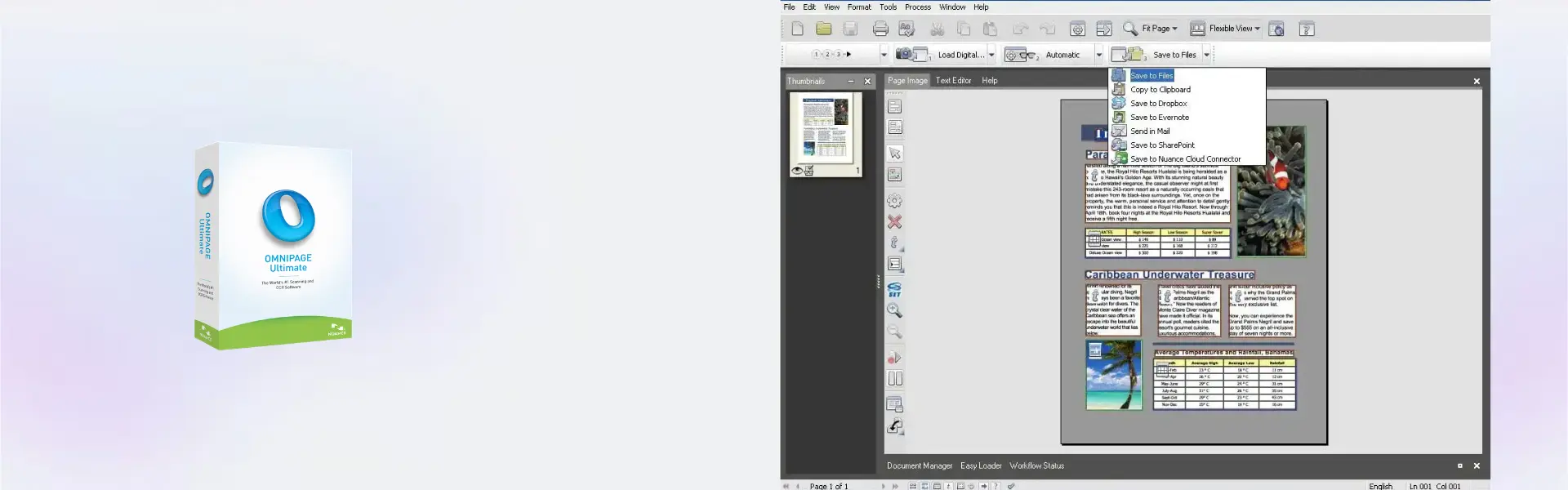
- Advanced OCR conversion: Turn scanned pages and image-based documents into editable text. This saves time and reduces manual typing.
- PDF to editable format support: Convert PDF content into usable documents. As a result, you can update, reuse, and repurpose existing files more easily.
- High-volume document processing: Handle large document batches with greater efficiency. This is useful for offices that work with archives, forms, reports, and records.
- Multi-language recognition: Work with documents in different languages. This helps international teams and multilingual businesses manage content more effectively.
- Document layout preservation: Keep text, columns, tables, and structure closer to the original file. This reduces editing time after conversion.
- Searchable document creation: Create files that are easier to search and archive. This helps users find important information faster.
- Lifetime access: Use the software on one activated Windows device without monthly or yearly subscription fees.
Main Features Explained
OCR Document Conversion
OCR document conversion changes scanned pages and image-based files into editable text. This is useful when you need to update documents that were originally created on paper.
It matters because manual retyping takes time and can lead to errors. With OCR, users can recover text from printed materials, archives, contracts, and reports more efficiently.
PDF and Image Text Recognition
PDF and image text recognition helps extract readable text from files that cannot be edited directly. This includes scanned PDFs, image documents, and digitized paperwork.
This matters for businesses that receive files in different formats. It gives teams a faster way to turn static content into usable digital information.
Batch Processing
Batch processing helps convert multiple documents with less manual effort. Instead of working file by file, users can process larger workloads more efficiently.
This is important for offices, legal teams, accounting departments, and administrators that manage large volumes of scanned documents.
Searchable Digital Archives
Searchable digital archives make stored files easier to find. After conversion, users can search inside documents instead of browsing through folders manually.
This helps improve record management, reduces wasted time, and supports a cleaner digital filing system.
Layout and Formatting Support
Layout and formatting support helps keep the converted document close to the original design. Tables, paragraphs, and page structure can be easier to review after conversion.
This matters because it reduces cleanup work and helps users move faster from scanned content to finished documents.
Why Choose Nuance OmniPage 19.2 Ultimate?
Nuance OmniPage 19.2 Ultimate is built for users who need accurate OCR, document conversion, and searchable file creation. It is suitable for businesses, offices, students, researchers, legal teams, accountants, and professionals who work with scanned documents often.
It helps convert paper-based information into editable digital content. This makes it easier to update files, search archives, reuse text, and reduce manual data entry.
Users comparing solutions in PDF document management software can choose this product when OCR accuracy and document conversion are the main priorities. It is especially useful for scanned files, image-based PDFs, and high-volume conversion work.
For users who need stronger desktop organization and scanned file management, Nuance PaperPort Professional 14.5 is a useful comparison. PaperPort focuses on organizing documents, while OmniPage focuses on advanced OCR and text recognition.
If your workflow includes PDF editing and conversion, Nuance PDF Converter Professional 8 may also be relevant. Users who need voice productivity can explore Nuance Dragon Professional Individual 14. For advanced PDF editing and business document control, Nuance Power PDF Advanced 2.1 can also support a professional workflow.
Nuance OmniPage 19.2 Ultimate vs Alternatives
Compared with basic scanning tools, Nuance OmniPage 19.2 Ultimate offers more value because it focuses on turning scanned content into editable and searchable text. Basic tools may capture an image of a page, but they do not always make the content easy to reuse.
Compared with Nuance PaperPort Professional 14.5, OmniPage is stronger for OCR conversion and text recognition. PaperPort is better for organizing scanned files and managing document folders.
Compared with PDF editors, OmniPage is better for extracting text from scanned or image-based documents. PDF editors are more useful when the main task is changing the structure, content, or layout of PDF files.
System Compatibility
Nuance OmniPage 19.2 Ultimate is made for Windows computers. Before installation, make sure your device is updated and ready for software setup.
An internet connection is required for online activation. The product is intended for one Windows device and is suitable for a single workstation used for OCR, document conversion, and digital archiving.
License Type Explanation
This product includes a Retail license for one computer. It is a one-time purchase with lifetime usage after successful activation.
The license can be installed and activated only once on one device. It cannot be transferred to another computer and cannot be used again after activation.
If the software is uninstalled, or if the device is formatted, the license is lost. Once activated correctly, it does not expire on the activated device.
Installation and Activation
- Complete your order and receive the product details by email.
- Download the software using the instructions provided after purchase.
- Run the installer on your Windows computer.
- Follow the setup steps shown during installation.
- Activate online when the software requests activation.
- Start using the software to convert scanned documents, PDFs, and image-based files.
Why Buy From Us
Digital License provides genuine software licenses with secure payment, fast digital delivery, and helpful support. We focus on a clear purchase experience, reliable product information, and compliant software sourcing.
- Genuine licenses: Receive authentic software from compliant distribution channels.
- Secure payment: Complete your order through protected checkout methods.
- Fast delivery: Get your product details by email shortly after purchase.
- Helpful support: Receive email and remote assistance for installation and activation.
- Legal compliance: Licenses are supplied in line with EU laws, including EU Directive 2009/24/EC, and industry standards.
Trust Section
Choose Nuance OmniPage 19.2 Ultimate from Digital License with confidence. We provide clear product details, secure transactions, reliable support, and compliant distribution standards.
Our goal is to help you activate your software smoothly and start converting documents without unnecessary delays.
FAQ
Can Nuance OmniPage 19.2 Ultimate convert scanned documents into editable text?
Yes. It is designed to convert scanned pages and image-based files into editable digital text.
Can I use Nuance OmniPage 19.2 Ultimate for PDF conversion?
Yes. It can help convert PDF content into editable and searchable formats, especially when working with scanned or image-based PDFs.
Is Nuance OmniPage 19.2 Ultimate suitable for business document archives?
Yes. It is useful for offices and businesses that need to convert, search, and organize large volumes of scanned paperwork.
Does Nuance OmniPage 19.2 Ultimate require internet activation?
Yes. Online activation is required, so an internet connection is needed during the activation process.
How will I receive Nuance OmniPage 19.2 Ultimate after purchase?
The product is delivered digitally by email with the installation and activation details.
Is Nuance OmniPage 19.2 Ultimate compatible with Windows?
Yes. This product is made for Windows systems. Make sure your device is updated before installation.
Can I transfer the software to another computer after activation?
No. It is intended for one activated device only and cannot be transferred after activation.
Does Nuance OmniPage 19.2 Ultimate expire after activation?
No. Once activated correctly on the intended device, it includes lifetime usage on that device.
Is this product supplied through compliant channels?
Yes. Digital License supplies genuine software licenses sourced through compliant distribution channels in line with EU laws, including EU Directive 2009/24/EC, and industry standards.
| Component | Requirement |
| Processor | 1 GHz Intel Pentium processor or higher (or equivalent) |
| RAM | 1 GB RAM minimum (2 GB recommended) |
| Storage | 2.7 GB free disk space for full installation |
| Operating System | Windows 11 / 10 / 8.1 / 8 / 7 (32-bit and 64-bit) |
| Display | 1024 × 768 resolution with 16-bit color or higher |
| Browser | Microsoft Internet Explorer 9 or later |
| Additional Requirements | Internet connection for activation and updates; TWAIN, WIA, or ISIS-compatible scanner for scanning features |
| Specification | Detail |
|---|---|
| Activation | Single PC (one-time activation) |
| License validity | Lifetime (does not expire after activation) |
| Delivery method | By email within 15 minutes |
| Languages | Multilingual |

1 – Buy
Shop securely with SSL encryption.

2 – Receive
You will receive the license key and download link.

3 – Download
Download and install the software.

4 – Activate
Enter the license key to the software.
Ashampoo 3D CAD Architecture 10
Parallels Desktop 20 Pro Edition Mac
VMware vCenter Server 7 Standard