












- Description
- Minimum Requirements
- Specifications
- Reviews
Microsoft Exchange Server 2016 Standard provides professional tools for on-premises email, mailbox management, calendars, contacts, and business communication. It is well suited to established organizations that still depend on Exchange Server 2016. You also receive instant digital delivery, lifetime usage, and no recurring subscription.
Overview of Microsoft Exchange Server 2016 Standard
- Platform: Windows Server (on-premises)
- Edition: Standard
- License Type: Retail
- Devices: 1 device (transferable to another server)
- License Duration: Lifetime
- Activation Method: Online activation
- Delivery: Instant digital delivery via email
- Support: Email and remote assistance
- Language Support: Multi-language
- Compliance: Genuine software licenses sourced through compliant distribution channels in line with EU laws and industry standards
Key Features
- On-premises email hosting: Manage business email inside your own server environment. This gives IT teams direct control over company messaging.
- Centralized mailbox management: Create and manage user mailboxes from one Exchange environment. This makes everyday administration easier.
- Shared calendars: Let users organize meetings, appointments, and schedules. This improves coordination between teams.
- Contact management: Keep business contacts and address information available through Exchange. This helps users communicate more efficiently.
- Outlook integration: Connect compatible Outlook clients to Exchange. Users can access email, calendars, and contacts from a familiar interface.
- Web-based access: Allow supported users to reach their mailbox through a browser. This provides another way to access business communication.
- Centralized administration: Manage users, permissions, mail flow, and server settings with Exchange tools. This gives administrators better control.
- Lifetime usage: Continue using the activated product without recurring subscription payments. This provides long-term value from a one-time purchase.
Main Features Explained
On-Premises Email Management
Microsoft Exchange Server 2016 Standard lets organizations manage business email on their own infrastructure.
This gives IT teams direct control over mailboxes and messaging settings. Therefore, it works well for established on-premises environments.
Mailbox Administration
Administrators can create user mailboxes and manage their settings centrally.
They can also control permissions and messaging policies. As a result, daily Exchange administration becomes easier to organize.
Outlook and Web Access
Compatible Outlook clients can connect to Exchange for email, calendars, and contacts.
Supported users can also access their mailboxes through a web browser. This gives employees more flexibility when accessing business communication.
Shared Calendars and Scheduling
Exchange supports shared calendars, meeting invitations, and scheduling tools.
This helps employees coordinate appointments and meetings. Therefore, teams can work together more efficiently.
Centralized Messaging Control
Exchange provides tools for managing mail flow, users, permissions, and server settings.
This gives IT administrators one central place for key messaging tasks. It also simplifies ongoing maintenance.
Why Choose Microsoft Exchange Server 2016 Standard?
Microsoft Exchange Server 2016 Standard is a practical choice for businesses and IT teams that maintain compatible on-premises infrastructure. It provides essential tools for email, calendars, contacts, mailboxes, and messaging administration.
It is especially useful when existing applications or business systems specifically depend on Exchange Server 2016.
Explore our Exchange Server 2016 options to compare available solutions for this Exchange generation.
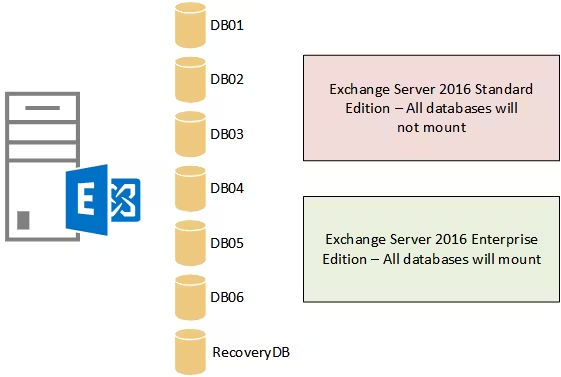
For larger or more demanding environments, compare it with Microsoft Exchange Server 2016 Enterprise. Standard suits moderate messaging needs, while Enterprise supports larger mailbox database environments.
After successful activation, you receive lifetime usage. There are no recurring subscription payments.
Microsoft Exchange Server 2016 Standard vs Alternatives
Microsoft Exchange Server 2016 Standard is designed for typical on-premises messaging environments. It provides the core tools needed for business email and mailbox administration.
Exchange Server 2016 Enterprise is better suited to larger deployments. It supports a broader mailbox database environment than Standard.
For a newer generation, consider Microsoft Exchange Server 2019 Standard. A newer version may be preferable when your infrastructure and applications support it.
Exchange Server 2016 is a legacy platform. Therefore, it is mainly suited to established environments that specifically require this generation.
System Compatibility
Microsoft Exchange Server 2016 Standard is intended for compatible Windows Server environments.
Before installation, confirm your Windows Server version and hardware requirements. Also review Active Directory, DNS, and network prerequisites.
In addition, check compatibility with Outlook clients and other applications that connect to Exchange.
Always review existing dependencies before replacing or changing an active Exchange deployment.
License Type Explanation
This product uses a Retail license. Under the terms of this specific offering, it can be activated on one server at a time.
The product is transferable to another server. Therefore, you can move it when replacing the original server, subject to the terms of this offering.
After successful activation, you receive lifetime usage. The product does not expire. There are no recurring subscription payments.
Only one server may use the activation at a time. The previous deployment should no longer remain in active use after a transfer.
This is a one-time purchase. Installation files are provided through official Microsoft download links.
Installation & Activation
- Confirm that your Windows Server environment supports Exchange Server 2016.
- Review Active Directory, DNS, and other required server prerequisites.
- Download the installation files from the provided official Microsoft source.
- Run setup and install Microsoft Exchange Server 2016 Standard.
- Complete online activation with the supplied activation information.
- Configure mailboxes, permissions, mail flow, and required server settings.
Why Buy From Us?
Digital License provides genuine software licenses, secure payments, fast digital delivery, and professional support. We also follow applicable EU laws and industry standards.
- Genuine licenses: Sourced through compliant distribution channels.
- Secure payment: Purchase through a protected checkout process.
- Instant delivery: Receive your order digitally via email.
- Professional support: Get email and remote assistance when needed.
- EU compliance: In line with EU laws, including EU Directive 2009/24/EC, and industry standards.
Digital License Is a Verified Microsoft Partner
Digital License is an official Microsoft Partner (ID: 7033487), recognized for delivering genuine software licenses and verified solutions across Europe. You can verify our partnership directly on the Microsoft Partner Directory. This ensures every license you purchase is authentic, secure, and fully compliant with Microsoft standards and applicable EU. laws (EU Directive 2009/24/EC) and industry standards.
Frequently Asked Questions
What is Microsoft Exchange Server 2016 Standard designed for?
It is designed for on-premises business email, mailboxes, calendars, contacts, and messaging administration.
Which platform supports Microsoft Exchange Server 2016 Standard?
It is intended for compatible Windows Server environments. Check all system and application requirements before installation.
Is Microsoft Exchange Server 2016 Standard suitable for new deployments?
Exchange Server 2016 is a legacy generation. Therefore, it is mainly suited to established environments that specifically require this version.
How is Microsoft Exchange Server 2016 Standard delivered?
You receive it through instant digital delivery via email. No physical shipment is required.
Does Microsoft Exchange Server 2016 Standard require a subscription?
No. It is a one-time purchase with lifetime usage after successful activation.
Can it be transferred to another server?
Yes. Under the terms of this specific offering, it is transferable to another server while remaining active on only one server at a time.
What is the difference between Standard and Enterprise?
Standard suits typical business messaging environments. Enterprise is intended for larger deployments that require greater mailbox database capacity.
Does Microsoft Exchange Server 2016 Standard work with Outlook?
Yes. It can work with compatible Microsoft Outlook versions. Always verify client compatibility before deployment.
Do I receive support with my purchase?
Yes. Digital License provides email and remote assistance for installation and activation issues.
Is purchasing this software compliant with EU law?
Yes. Digital License supplies genuine software licenses through compliant distribution channels in line with applicable EU laws and industry standards.
| Component | Requirement |
| Processor | 64-bit processor with at least 2 cores (Intel EM64T or AMD64) |
| RAM | 8 GB minimum; 16 GB recommended for Mailbox role |
| Storage | 30 GB for installation; 200 MB per language pack; additional space for message queues and logs |
| Operating System | Windows Server 2012, 2012 R2, or 2016 Standard/Datacenter |
| .NET Framework | .NET Framework 4.5.2 or later |
| Display | Minimum resolution 1024 × 768 |
| Specification | Detail |
|---|---|
| Activation | Single PC (one-time activation) |
| License validity | Lifetime (does not expire after activation) |
| Delivery method | By email within 15 minutes |
| Languages | Multilingual |

1 – Buy
Shop securely with SSL encryption.

2 – Receive
You will receive the license key and download link.

3 – Download
Download and install the software.

4 – Activate
Enter the license key to the software.
Windows Server 2016 Datacenter
Windows Server 2019 Essentials