











- Description
- Minimum Requirements
- Specifications
- Additional information
- Reviews
EaseUS Video Editor is a powerful multimedia solution designed for intuitive video editing, creative storytelling, and fast media production. Enjoy instant digital delivery, flexible licensing options, and access without recurring subscription fees.
The software is ideal for creators, educators, business users, and beginners who need advanced tools for video production on Windows 10 and Windows 11.
Overview of EaseUS Video Editor
- Platform: Windows 10/ 11
- Edition: Video Editor
- Devices: 1 Device
- License Duration: 1 Month/ 1 Year/ Lifetime
- Activation Method: Online activation
- Delivery: Instant digital delivery via email
- Support: Email and remote assistance
- Language Support: Multi-language
- Compliance: Genuine software licenses sourced through compliant distribution channels in line with EU laws (EU Directive 2009/24/EC) and industry standards.
Key Features
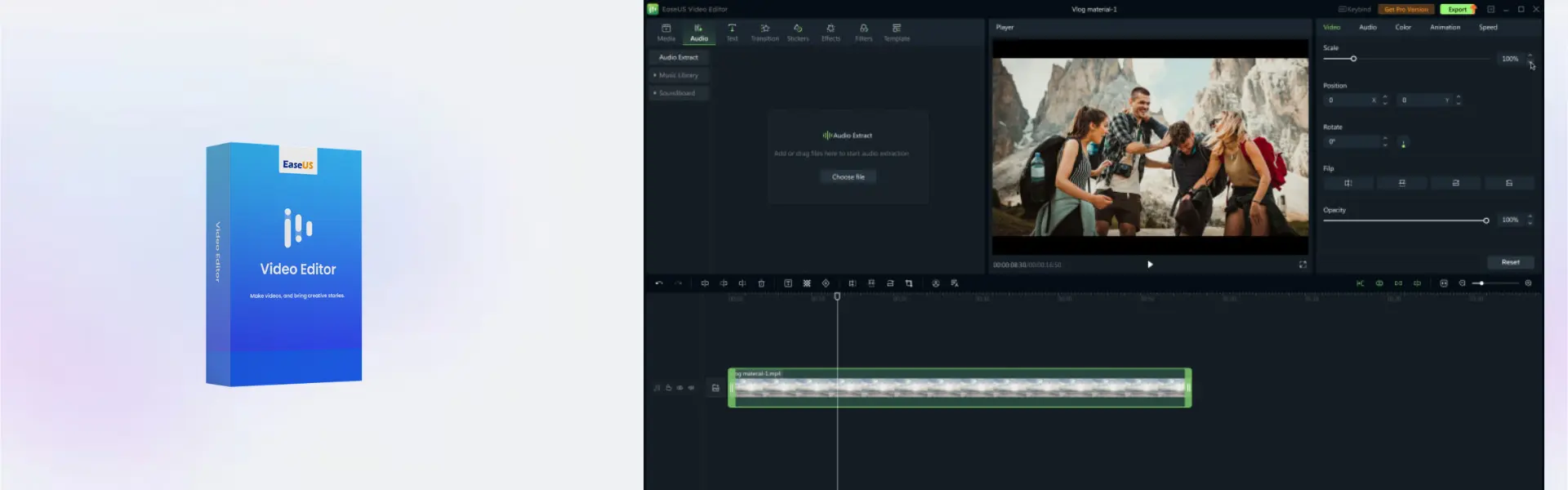
- Professional timeline editing allows users to trim, split, merge, and organize clips with precision for polished video projects.
- Creative visual effects enhance content with cinematic transitions, overlays, filters, and animated elements.
- Advanced audio optimization improves voice clarity, synchronization, and sound quality for professional production results.
- High-resolution exporting supports HD and 4K output optimized for streaming platforms and social media content.
- Fast rendering performance reduces export times and increases workflow efficiency during large editing projects.
- User-friendly interface simplifies professional editing for beginners without sacrificing advanced functionality.
- Wide media compatibility supports multiple audio and video formats for seamless editing across devices.
Main Features Explained
Timeline Editing
EaseUS Video Editor includes a structured editing timeline that helps users organize clips, transitions, effects, and audio tracks efficiently.
Effects and Filters
The integrated effects library provides transitions, filters, overlays, and animated elements for more engaging visual storytelling.
Audio Editing
Built-in sound enhancement tools help remove background noise, adjust volume levels, and synchronize voiceovers accurately.
HD & 4K Export
The high-performance export engine delivers smooth, high-quality video output for online publishing and professional presentations.
Optimized Rendering
Efficient processing technology accelerates video rendering and exporting for faster multimedia production workflows.
Why Choose EaseUS Video Editor?
EaseUS Video Editor is perfect for users seeking a complete video editing platform that combines professional creative tools with ease of use. It is suitable for YouTubers, educators, freelancers, businesses, and multimedia creators.
Explore additional multimedia solutions within the EaseUS software collection.
Compared to EaseUS RecExperts, which primarily focuses on screen recording, EaseUS Video Editor provides more advanced editing and production capabilities.
Users recovering deleted multimedia files can also benefit from EaseUS Data Recovery Wizard Professional.
Professionals working across portable systems may improve workflow flexibility with EaseUS OS2Go Professional.
EaseUS Video Editor vs Alternatives
EaseUS Video Editor combines editing, effects management, audio enhancement, and exporting tools within one intuitive application. Many alternative solutions require multiple programs to achieve similar functionality.
Unlike basic editing applications, this software provides advanced creative tools while remaining accessible for beginners and casual users.
The option for lifetime usage also helps avoid recurring subscription expenses.
System Compatibility
EaseUS Video Editor is fully compatible with modern Windows 10 and Windows 11 environments, delivering stable performance for both personal and professional projects.
The optimized multimedia engine ensures smooth playback, rendering, and exporting during demanding editing sessions.
License Type Explanation
EaseUS Video Editor is available in 1 Month, 1 Year, and Lifetime options for one device.
The permanent version offers a one-time purchase without recurring subscription renewals or ongoing fees.
The software is activated online and can be used on one active device at a time.
Installation & Activation
- Complete your purchase through our secure online store.
- Receive your activation details instantly via email.
- Download EaseUS Video Editor to your computer.
- Install the software on your Windows device.
- Complete the online activation using the provided credentials.
- Start editing and exporting professional-quality videos immediately.
Why Buy From Us
We provide reliable software solutions backed by fast delivery and professional customer support.
- Genuine software licenses sourced from compliant distribution channels
- Secure payment systems for protected online transactions
- Professional technical assistance via email and remote support
- Instant digital delivery immediately after order confirmation
- Compliance with EU regulations and industry standards under EU Directive 2009/24/EC
Trust Section
EaseUS Video Editor is trusted by multimedia creators, educators, businesses, and content professionals who require stable editing performance and efficient production workflows.
FAQ
How will I receive EaseUS Video Editor?
You will receive activation details and installation instructions via email after purchase.
Is EaseUS Video Editor compatible with Windows 11?
Yes, the software is fully compatible with both Windows 10 and Windows 11.
Does activation require an internet connection?
Yes, online activation requires an active internet connection.
Can I use the software on multiple devices?
No, the product is intended for use on one device only.
Are there subscription fees for the lifetime version?
No, the lifetime version requires only a one-time payment.
What editing tools are included?
The software includes timeline editing, transitions, filters, audio tools, and HD export functionality.
Is technical support included?
Yes, email and remote assistance support are included.
Are the licenses compliant with EU regulations?
Yes, all licenses are sourced through compliant distribution channels following EU regulations.
Is EaseUS Video Editor suitable for beginners?
Yes, the intuitive interface makes the software easy to use for both beginners and professionals.
| Component | Requirement |
| Processor | Intel® i3 processor or faster |
| RAM | 4 GB minimum (8 GB recommended) |
| Storage | At least 2 GB free disk space for installation and video processing |
| Operating System | Windows 11/10 (64-bit) |
| Graphics Card | DirectX-compatible graphics device |
| Display | 1280 × 720 screen resolution or higher |
| Internet Connection | Required for activation, updates, and online resources |
| Specification | Detail |
|---|---|
| Activation | Single Device License (1 PC) |
| License validity | 1 Month/ 1 Year/ Lifetime (one-time purchase) |
| Delivery method | By email within 5–15 minutes |
| Languages | Multilingual |
Additional information
| Subscription period | 1 Month, 1 Year, Lifetime |
|---|

1 – Buy
Shop securely with SSL encryption.

2 – Receive
You will receive the license key and download link.

3 – Download
Download and install the software.

4 – Activate
Enter the license key to the software.
Ashampoo 3D CAD Professional 10
VMware vCenter Server 7 Standard