







































- Description
- Minimum Requirements
- Specifications
- Reviews
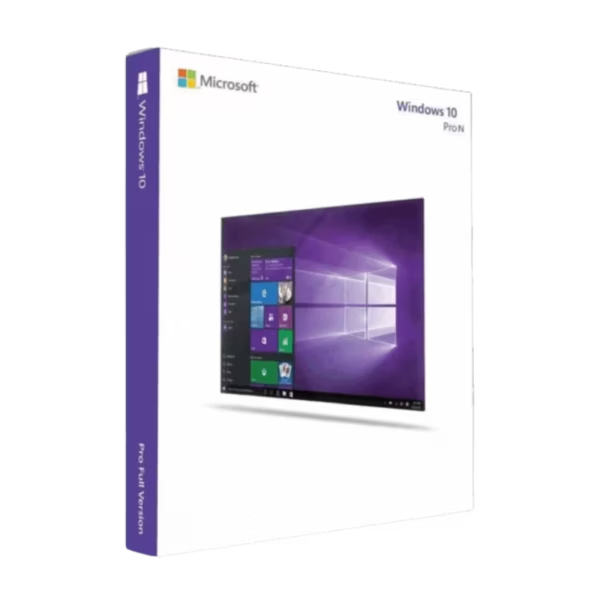
Windows 10 Pro N delivers a secure, professional, and flexible Windows environment for business users, remote workers, developers, and advanced users. It combines powerful professional tools with the specialized N configuration. You also get instant digital delivery, lifetime usage, and no subscription fees.
Overview of Windows 10 Pro N
- Platform: Windows
- Edition: Pro N
- License Type: Retail
- Devices: 1 device
- License Duration: Lifetime
- Activation Method: Online activation
- Delivery: Instant digital delivery via email
- Support: Email and remote assistance
- Language Support: Multi-language
- Compliance: Genuine software licenses sourced through compliant distribution channels in line with EU laws and industry standards
Key Features
- BitLocker encryption: Protect supported drives and sensitive files with encryption. This adds an extra layer of data security for business and personal information.
- Remote Desktop: Connect to a properly configured computer from another compatible device. Therefore, professionals can access files, applications, and work resources from another location.
- Hyper-V virtualization: Create virtual machines on supported hardware. This is useful for development, testing, training, and technical workloads.
- Windows Sandbox: Run supported applications inside a temporary isolated environment. As a result, you can test unfamiliar software without changing your main Windows setup.
- Group Policy management: Control system settings and user configurations in greater detail. This helps professionals maintain a structured and managed computing environment.
- Windows Security: Built-in protection tools help defend your PC against malware and common digital threats. This supports safer everyday work and browsing.
- N edition configuration: This edition excludes certain built-in media technologies. Therefore, it is suitable for users who specifically need the Windows N environment.
Main Features Explained
BitLocker Encryption
BitLocker helps secure information stored on supported drives through encryption. It can protect customer records, financial documents, project files, and other sensitive data.
This is especially useful on business laptops and professional computers. As a result, users gain stronger data protection if a device is lost or accessed without permission.
Remote Desktop
Remote Desktop allows a properly configured Windows 10 Pro N computer to accept remote connections. You can access your desktop, applications, and files from another compatible device.
Therefore, it is useful for remote workers, IT professionals, and business users who need flexible access to their primary PC.
Hyper-V Virtualization
Hyper-V allows compatible computers to create and run virtual machines. Each virtual environment operates separately from the main Windows installation.
For example, developers can test applications without changing their main setup. This makes Hyper-V valuable for development, testing, training, and IT administration.
Windows Sandbox
Windows Sandbox creates a temporary environment for supported applications. When the sandbox is closed, its temporary content is removed.
Therefore, it provides a practical way to perform isolated software testing while keeping your main Windows environment separate.
N Edition Media Configuration
Windows 10 Pro N includes the core professional features of the Pro edition but excludes certain built-in media technologies. Some multimedia applications and functions may therefore require additional media components.
This difference matters when choosing between Pro N and the standard Pro edition. Users who depend heavily on built-in multimedia functionality may prefer the standard version.
Why Choose Windows 10 Pro N?
Windows 10 Pro N is designed for professionals, small businesses, developers, remote workers, and advanced users who specifically need the N edition. It combines everyday productivity with security, virtualization, remote access, and advanced management tools.
For example, BitLocker helps protect sensitive information. Meanwhile, Remote Desktop supports flexible work, while Hyper-V provides useful tools for technical projects.
You can explore our Windows 10 operating system licenses to compare other editions and find the option that best matches your workflow.
If you prefer the standard Pro edition with its usual built-in media technologies, consider Windows 10 Pro. It offers the same professional focus without the N edition media configuration.
After successful activation, Windows 10 Pro N provides lifetime usage. Since it is a one-time purchase, there are no recurring operating system subscription fees.
Windows 10 Pro N vs Alternatives
Windows 10 Pro N and Windows 10 Pro share many professional Windows capabilities. Both provide features for security, virtualization, remote access, and advanced system management.
The main difference is the media configuration. Pro N excludes certain built-in media technologies, while the standard Pro edition includes them.
Therefore, choose Pro N when you specifically need the N configuration. The standard Pro edition may be more convenient when multimedia features are important to your daily workflow.
Users with compatible newer hardware can also consider Windows 11 Pro N. It provides the newer Windows interface while keeping the specialized N edition approach.
System Compatibility
Before installing Windows 10 Pro N, check that your computer meets the required Windows 10 hardware specifications. This helps reduce installation and performance problems.
Your PC should have a compatible processor, sufficient memory, enough storage, and supported graphics hardware. Some advanced features may also require specific hardware capabilities.
In addition, the N edition excludes certain media technologies by default. Therefore, some multimedia applications and features may require additional media components.
License Type Explanation
This product uses a Retail license. Under the terms of this specific offering, it can be installed and activated once on one computer.
After successful activation, it provides lifetime usage and does not expire. It is also a one-time purchase, so there are no recurring subscription payments.
However, this Retail license cannot be transferred or reused on another computer. If Windows is uninstalled or the activated device is formatted, the license is lost.
Therefore, activate it only on the computer you intend to keep using. Installation files are provided through official Microsoft download links.
Installation & Activation
- Check that your computer meets the Windows 10 system requirements.
- Download the installation files from the official Microsoft download source.
- Install Windows 10 Pro N on the intended computer.
- Complete the Windows setup and connect the device to the internet.
- Open Windows activation settings and complete online activation.
- If needed, contact our team for email or remote assistance.
Why Buy From Us?
Digital License provides genuine software licenses, secure payments, fast digital delivery, and professional customer support. In addition, we focus on compliant distribution and a reliable purchasing experience.
- Genuine licenses sourced through compliant distribution channels
- Secure payment for a protected checkout experience
- Instant digital delivery directly via email
- Professional support through email and remote assistance
- EU compliance in line with EU laws, including EU Directive 2009/24/EC, and industry standards
Digital License Is a Verified Microsoft Partner
Digital License is an official Microsoft Partner (ID: 7033487), recognized for delivering genuine software licenses and verified solutions across Europe. You can verify our partnership directly on the Microsoft Partner Directory. This ensures every license you purchase is authentic, secure, and fully compliant with Microsoft standards and applicable EU. laws (EU Directive 2009/24/EC) and industry standards.
Frequently Asked Questions
How do I activate Windows 10 Pro N?
Install Windows on the intended computer first. Then connect the device to the internet and complete online activation through the Windows activation settings.
How is Windows 10 Pro N delivered?
Your order is provided through instant digital delivery via email. Therefore, there is no need to wait for physical shipping.
Does Windows 10 Pro N require a subscription?
No. This specific offering is a one-time purchase with lifetime usage after successful activation.
What is different about Windows 10 Pro N?
The N edition includes the main professional Windows features but excludes certain built-in media technologies. Some multimedia applications may therefore require additional media components.
Who should use Windows 10 Pro N?
It is well suited to professionals, businesses, developers, remote workers, and advanced users who specifically require the N edition configuration.
Can I transfer this Retail license to another computer?
No. This specific Retail license is intended for one-time activation on one computer. It cannot be transferred or activated again on another device.
What happens if I format the activated computer?
If the computer is formatted or Windows is uninstalled, the license is lost and cannot be reused. Therefore, activate it only after the final installation is ready.
Is Windows 10 Pro N compatible with every computer?
No. Your PC must meet the required Windows 10 hardware specifications. Some professional features may also require compatible hardware.
How does Windows 10 Pro N compare with Windows 10 Pro?
Both provide professional security, virtualization, remote access, and management tools. However, Windows 10 Pro N excludes certain media technologies that are included with the standard Pro edition.
Is purchasing this software compliant with EU law?
Digital License supplies genuine software licenses sourced through compliant distribution channels in line with applicable EU laws, including EU Directive 2009/24/EC, and industry standards.

| Component | Requirement |
| Processor | 1 GHz or faster processor or System on a Chip (SoC) |
| RAM | 1 GB for 32-bit or 2 GB for 64-bit |
| Storage | 16 GB for 32-bit OS or 20 GB for 64-bit OS |
| Operating System | Windows 10 Pro N |
| Graphics card | DirectX 9 or later with WDDM 1.0 driver |
| Display | 800 x 600 resolution |
| Specification | Detail |
|---|---|
| Activation | Single PC (one-time activation) |
| License validity | Lifetime (does not expire after activation) |
| Delivery method | By email within 15 minutes |
| Languages | Multilingual |

1 – Buy
Shop securely with SSL encryption.

2 – Receive
You will receive the license key and download link.

3 – Download
Download and install the software.

4 – Activate
Enter the license key to the software.
Windows 11 Enterprise IoT LTSC 2024
Office 2024 Professional Plus + Windows 10 Pro
